Node.jsでCRUD簡易掲示板を作る【RestfulAPI+SQLite】

Node.jsはサーバーサイドで動作するJavaScriptの実行環境である。
Node.jsの強みは非同期処理。DBやファイルIO、リクエスト・レスポンスなどで発生するIOバウンドの処理を高速化できる。
本記事では、APIサーバーとして動作できるよう、基本のCRUDを解説する。
環境構築
mkdir startup_bbs && cd startup_bbs

npm init

npm install express

npm install sqlite3
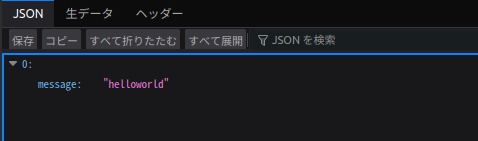
基本のHelloworld
index.js
// API
const express = require("express");
const app = express();

app.get("/", (req, res) => {
    const messages = [
        {"message":"helloworld"}
    ]
    res.json(messages);
});

// サーバー起動
app.listen(3000, () => {
    console.log("Server running on http://localhost:3000");
});
サーバー起動
node index.js
DBの初期化
db_init.js
const sqlite3 = require("sqlite3").verbose();
const db = new sqlite3.Database("./db.sqlite3");

db.serialize(() => {
    db.run(`
        CREATE TABLE IF NOT EXISTS topic (
            id INTEGER PRIMARY KEY AUTOINCREMENT,
            comment TEXT NOT NULL
        )
    `);
    console.log("DB initialized.");
});

db.close();
次のコマンドで初期化できる
node db_init.js
index.jsをCRUD簡易掲示板仕様に編集
const express = require("express");
const sqlite3 = require("sqlite3").verbose();

const app = express();
const db = new sqlite3.Database("./db.sqlite3");

app.use(express.json());

// 一覧表示
app.get("/api/v1/topics", (req, res) => {
    db.all("SELECT * FROM topics", (err, rows) => {
        if (err) return res.status(500).json({ error: err.message });
        res.json(rows);
    });
});

// 個別表示
app.get("/api/v1/topics/:id", (req, res) => {

    db.get("SELECT * FROM topics WHERE id = ?", [req.params.id], (err, row) => {
        if (err) return res.status(500).json({ error: err.message });
        if (!row) return res.status(404).json({ error: "Not found" });
        res.json(row);
    });
});

// 登録
app.post("/api/v1/topics", (req, res) => {
    if (!req.body.comment) {
        return res.status(400).json({ error: "comment is required" });
    }

    db.run("INSERT INTO topics (comment) VALUES (?)", [req.body.comment], function(err) {
        if (err) return res.status(500).json({ error: err.message });
        res.json({ id: this.lastID, comment: req.body.comment });
    });
});

// 更新
app.put("/api/v1/topics/:id", (req, res) => {
    if (!req.body.comment) {
        return res.status(400).json({ error: "comment is required" });
    }

    db.run("UPDATE topics SET comment = ? WHERE id = ?", [req.body.comment, req.params.id], function(err) {
        if (err) return res.status(500).json({ error: err.message });
        res.json({ updated: this.changes });
    });
});

// 削除
app.delete("/api/v1/topics/:id", (req, res) => {
    db.run("DELETE FROM topics WHERE id = ?", [req.params.id], function(err) {
        if (err) return res.status(500).json({ error: err.message });
        res.json({ deleted: this.changes });
    });
});

app.listen(3000, () => {
    console.log("Server running on http://localhost:3000");
});
function 関数を使っているのは、thisを使用しているため。
アロー関数を使うとthisを束縛しなくなり外側スコープのthisを参照してしまう。そのため、this.lastIDなどはundefined になる。
サーバーを起動する。
node index.js
APIクライアント(シェルスクリプト)
#! /bin/bash

# 登録
for i in {1..10}
do
    curl -X POST http://localhost:3000/api/v1/topics \
         -H "Content-Type: application/json" \
         -d '{"comment":"こんにちは世界"}' \
         -w "\n"
done

# 一覧表示
curl -X GET http://localhost:3000/api/v1/topics -w "\n"


# 個別取得
curl -X GET http://localhost:3000/api/v1/topics/1 -w "\n"


# 編集
for i in {4..7}
do
    curl -X PUT http://localhost:3000/api/v1/topics/${i} \
         -H "Content-Type: application/json" \
         -d '{"comment":"このコメントは編集されました"}' \
         -w "\n"
done

# 削除
for i in {1..3}
do
    curl -X DELETE http://localhost:3000/api/v1/topics/${i} \
         -w "\n"
done


# 再度、一覧表示と個別取得
curl -X GET http://localhost:3000/api/v1/topics -w "\n"
curl -X GET http://localhost:3000/api/v1/topics/1 -w "\n"
見やすく改行をするために、-wオプションを加えた。
動かすとこうなる。
{"id":1,"comment":"こんにちは世界"}
{"id":2,"comment":"こんにちは世界"}
{"id":3,"comment":"こんにちは世界"}
{"id":4,"comment":"こんにちは世界"}
{"id":5,"comment":"こんにちは世界"}
{"id":6,"comment":"こんにちは世界"}
{"id":7,"comment":"こんにちは世界"}
{"id":8,"comment":"こんにちは世界"}
{"id":9,"comment":"こんにちは世界"}
{"id":10,"comment":"こんにちは世界"}
[{"id":1,"comment":"こんにちは世界"},{"id":2,"comment":"こんにちは世界"},{"id":3,"comment":"こんにちは世界"},{"id":4,"comment":"こんにちは世界"},{"id":5,"comment":"こんにちは世界"},{"id":6,"comment":"こんにちは世界"},{"id":7,"comment":"こんにちは世界"},{"id":8,"comment":"こんにちは世界"},{"id":9,"comment":"こんにちは世界"},{"id":10,"comment":"こんにちは世界"}]
{"id":1,"comment":"こんにちは世界"}
{"updated":1}
{"updated":1}
{"updated":1}
{"updated":1}
{"deleted":1}
{"deleted":1}
{"deleted":1}
[{"id":4,"comment":"このコメントは編集されました"},{"id":5,"comment":"このコメントは編集されました"},{"id":6,"comment":"このコメントは編集されました"},{"id":7,"comment":"このコメントは編集されました"},{"id":8,"comment":"こんにちは世界"},{"id":9,"comment":"こんにちは世界"},{"id":10,"comment":"こんにちは世界"}]
{"error":"Not found"}
先の this.changes は 編集・削除をした行数を意味している。
補足事項
【補足1】Nodeはデフォルトでファイルの編集を検知して自動的にサーバーを再起動はしない
そのため、nodemonを使用する
npm install